Monthly Archives: April 2007

soapUI vs. JUnit

Open source soapUI tool has a number of benefits over developing test cases in Java using JUnit framework. Some of these benefits include:

  • Use of UI for creating/configuring tests. This makes it possible for non-programmers to develop tests, which means that testing of Web services can be performed by a QA/system test group.
  • Auto-generation of test messages based on WSDL.
  • Ability to externalize test data using property files.
  • Built-in assertions, such as checking for SOAP faults and validity of the schema.
  • Built-in stress testing capabilities.
  • Management of endpoint URLs.

Overall, soapUI allows developers and testers to create tests quicker and also makes tests easier to manage and update.

However, one needs to understand shortcomings of this approach. soapUI uses its own Web services client. The way it creates test messages is different from how regular (JAX-WS-based and other) Web services clients work. soapUI completely skips the step of generating Java classes from WSDL. It does not have to deal with XML marshalling/unmarshalling from/to Java objects. As a result, you are not invoking your service the way it will be invoked by real Web service consumers.

Technically, it may not be an issue in a majority of cases. The fact that soapUI is able to parse your WSDL/schema and generate test message means that you have a valid WSDL that should also be consumable by other technologies. However, it is possible that your WSDL/ schema may lead to sub-optimal (albeit perfectly valid) generated classes. For example, the schema that defines <addresses><address>…</address>…</addresses> XML will result in JAXB compiler generating Addresses class that returns the list of type Address. This may or may not be how you want Java classes to look like for the clients. Perhaps you may want to consider to get rid of <addresses> so that no extra class is generated.

In other words, using soapUI (or similar UI-based Web services testing tools, such as SOAPScope) does not allow you to understand all the details of how your Web service will be consumed in the real world.

Another advantage of JUnit test cases is that they can be used as examples illustrating the use of your service. The test classes can be published along with other Web service documentation or handed over to consumers to help them jump-start their client implementations. Unfortunately, soapUI test cases can’t be used for this purpose.

The shortcomings of visual testing tools such as soapUI can be addressed by complementing soapUI tests with JUnit tests. I usually start with soapUI since it is so easy to get up and running with it. Once soapUI test is implemented, I go back to Java, generate Web services client classes from WSDL and implement a JUnit test class. The logic that goes into a JUnit test class obviously depends upon a Web service. But at the very least, there should be one JUnit test per service that invokes the service using generated classes and libraries provided by your Web service product of choice. This way, we can see exactly how our services will be consumed by our clients.

Create JAX-WS Service in 5 Minutes (Tutorial)

This is a brief tutorial describing how to create a Web service using WSDL and annotations.
The approach presented here allows you to design and implement your WSDL/Schema and Java classes
independently without having to generate anything. You can then use annotations
to map Java classes to appropriate WSDL and Schema elements.

Since JAXB and JAX-WS have sensible defaults, the number of annotations can be kept
to the minimum.

In my opinion, it is always best to develop WSDL and schemas by hand to ensure that the
service contract is appropriately defined and also that the schema
can be re-used (by other services) and extended if necessary. I do not recommend using annotations
for automatically producing WSDL and schemas at runtime as this leads to
simplistic schemas and WSDLs.

Generating classes from WSDL/schema sometimes makes sense, say in situations
when you have to use a pre-defined schema. However, as with any code generation,
it creates a maitainance problem especially if there is a need to put behavior
into generated classes. So it is desirable to be able to evolve object model and
service implementation classes independently
from WSDL/schemas. You can do it quite easily by following the steps below.

Even though I use the word “create” when describing some of the steps, the same approach
will also work for updates or refactoring caused by changes in
service requirements.

The steps are the following:

  • Design your service interface. In our case the service has a single “add” operation that accepts
    a “person” document, adds it to a database and returns back the status:

    public String add( Person person )
  • Design your data/object model. In our case Person class has three fields
    (ssn, firstName, lastName) and the list of addresses.
    Real world examples will certainly be more complex, but this is good enough for our purposes.
  • Define XML schema based on your object model.
    Use strict datatypes where possible. For example, we use
    xsd:token instead of xsd:string since “token” does not allow
    carriage return, tabs, and leading spaces:
  •     <xsd:element name="person">
            <xsd:complexType >
                <xsd:sequence>
                    <xsd:element name="ssn" type="xsd:token" 
                            minOccurs="1" maxOccurs="1"/>
                    <xsd:element name="firstName" type="xsd:token" 
                            minOccurs="1" maxOccurs="1"/>
                    <xsd:element name="lastName" type="xsd:token" 
                            minOccurs="1" maxOccurs="1" />
                    <xsd:element name="address" type="Address" 
                            minOccurs="1" maxOccurs="unbounded"/> 
                </xsd:sequence>
            </xsd:complexType>
        </xsd:element>
      

    Complete schema file

  • Create an XML file for your schema so you can test the schema.
    You can generate an XML instance document
    automatically from Eclipse (assuming you’re using
    Eclipse Web Tool Platform
    )
    by right-clicking on the schema in navigator and selecting “generate”.
    Test the schema by changing data and making sure that you’re getting correct
    validation errors.
  • Sample XML file

  • Create WSDL. Our WSDL imports the schema that we just created.
    Note that the WSDL target namespace is different from the schema namespace since the
    same schema can be reused by different WSDLs:
  •     <wsdl:definitions 
              targetNamespace="http://personservice" 
              xmlns="http://personservice" 
              xmlns:pers="http://person"
              xmlns:soapenc="http://schemas.xmlsoap.org/soap/encoding/" 
              xmlns:wsdl="http://schemas.xmlsoap.org/wsdl/" 
              xmlns:wsdlsoap="http://schemas.xmlsoap.org/wsdl/soap/" 
              xmlns:xsd="http://www.w3.org/2001/XMLSchema">
      
          <wsdl:types>
                <xsd:import namespace="http://person" 
                        schemaLocation="person.xsd" />
                <!-- Return value -->
                <xsd:element name="status" type="xsd:string" />
          </wsdl:types>
          ...
      

    Complete WSDL file

  • Create your object model classes and annotate them with appropriate JAXB annotations:
  •     // By default JAXB uses getters/setters for marshaling/unmarshaling
        // Using fields access allows us not to define getters/setters for 
        // all mapped instance variables.
        @XmlAccessorType(XmlAccessType.FIELD)
        // We need to provide the namespace, otherwise it defaults to
        // the package name
        @XmlRootElement(namespace="http://person")
        public class Person {
        
            // we only need annotations for variables that don't match 
            // element names
            private String ssn;
            private String firstName;
            private String lastName;
            
            @XmlElement(name = "address")
            protected List<Address> addresses;
          ...
      

    Person class

    Address class

  • Create ObjectFactory class. This class is required by JAXB and it
    should contain factory methods for all JAXB-mapped classes. ObjectFactory
    must resides in the same package with object model classes.
  •     @XmlRegistry
        public class ObjectFactory {
        
            public Person createPerson() {
                return new Person();
            }
            
            public Address createAddress() {
                return new Address();
            }
        }
      

    ObjectFactory class

  • Create Web Service implementation class. Note that with JAX-WS
    Service Endpoint Interface (SEI) is optional, so all you need is an implementation class:
  •       @WebService(
                  // all values must match corresponding attributes 
                  // and elements of the WSDL file
              
                  // Name of the port type in WSDL
                  name="PersonService",
                  // Target namespace of WSDL, could be 
                  // different from the schema namespace
                  targetNamespace="http://personservice",
                  serviceName="PersonServicePorts",
                  portName="PersonService",
                  // the file must be available to Web container
                  wsdlLocation="WEB-INF/wsdl/PersonService.wsdl"
          )
          
          /*
           * We'are using "bare" style since "add" operation 
           * takes only one argument, person document. Therefore, there 
           * is no need to "wrap" it by nesting it inside operation element.
           * Note that "wrapped" style is the default.
           */
          @SOAPBinding(parameterStyle=SOAPBinding.ParameterStyle.BARE)
          
          public class PersonService {
              
              @WebResult(name = "status")
              public String add( Person person ) {
                  
                  System.out.println("Adding person :"+person );
                  return "Added "+person.getFullName();
              }
          }
      

    PersonService class

  • Deploy your Web service to your application server or Web services container.
    Refer to your application server documentation for details.
  • Test the service.
    The easiest way to test the service is to use open source soapUI tool.
    You can install it as Eclipse plugin (there are also plugins for
    NetBeans and IDEA) following these instructions.
    In Eclipse, open SoapUI view, right click and create a project from your WSDL file. SoapUI will automatically
    create a sample SOAP request which you can update with your data. You can run it right away.
    Later, you can create a repeatable test suite with parametirized data using SoapUI properties and
    assertions:
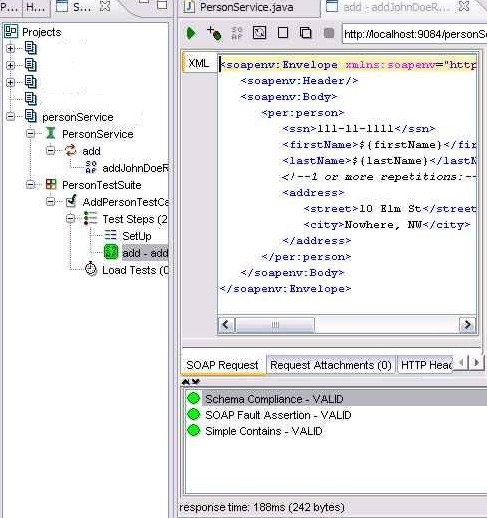
SoapUI Project (you can import it into SoapUI).

You can also download all files in a zip file.

WS-I Basic Security Profile Has Been Released

The final version of Basic Security Profile 1.0 (BSP) was recently been released by WS-I. This is certainly a welcome event; WS-Security is broad and complex and it has been plagued by interoperability issues for quite some time (although the situation has improved in the last year or so). The BSP document seems to have pretty good level of details with plenty of good examples that are easy to follow.

I looked at a few messages generated by Axis used in conjunction with Apache WS-Security implementation called Rampart and at the first glance they seem to be compliant with BSP, although all my examples use WS-Security username token profile, which is the simplest form of passing credentials with WS-Security.

As an example, Rampart generates the correct form of the password tag, which includes “type” attribute (this attribute is not mandated by WS-Security, however, it is required by BSB):

<wsse:Password
      Type="http://docs.oasis-open.org/wss/2004/01/oasis-200401-wss-username-token-profile-1.0#PasswordDigest">
      B5twk47KwSrjeg==
   </wsse:Password>

BSP is going to make the use of WS-Security more widespread, although this is not going to happen overnight. Currently, none of the public Web services (Yahoo, Ebay, Amazon) use WS-Security, which is not surprising since the standard is not fully supported by such languages as PHP, Python and Ruby (although some aspects of WS-Security are supported in PHP). Even platforms for commercial services, such as StrikeIron, don’t use it (StrikeIron does support WS-Security for communication between its broker and service providers, but not for client calls).

In any event, I’m pretty confident that we can count on rising WS-Security adoption in an enterprise.

WSDL Naming Conventions

Web service providers communicate with their customers (consumers) by the means of publishing WSLD of the service. In most cases, developers create the client code for the service by generating classes from the published WSDL file. While JAX-WS makes it possible to avoid code generation entirely (as I described in
this post) and hand-code all client-side classes, in all but the most trivial cases using code generation is the easiest way to start developing a Web service client.

Service providers need to keep in mind that WSDL is the only “bridge” between providers and consumers. Service providers may have great clean code with nicely defined interfaces and object model; however, this code won’t be shared with consumers (unless, perhaps, we are talking about an internal service used for integrating components of the same application, but even in this case developers should beware of created tight coupling). Therefore we need to make sure that WSDL that we publish will help service consumers generate good client-side code.

JAX-WS mandates the following mappings between WSDL and the generated client code:

  • wsdl:portType translates to the Java interface (business interface) of a Web service (where each operation maps to a method of the interface).
  • wsdl:service translates to, essentially, a factory class that extends javax.xml.ws.Service. This class has “get” methods for each port defined as part of the service element. “getPortName” methods return dynamic proxy that implements the service business interface.
  • Some tools (e.g., WebSphere Web Services Feature Pack) generate additional proxy classes (not to be confused with the dynamic proxy created by the Service subclass) for each port. The proxy class encapsulates logic for accessing javax.xml.ws.Service to invoke the right “get” method. Client code then only needs to instantiate the proxy class and call a business method. The name of the proxy class is NameOfThePortProxy.

Keeping these rules in mind, I use the following naming conventions to ensure that the generated code will contain classes with meaningful names:

  • I use the name of the service business interface as the name of the port type, e.g., POProcessor or PersonService. This ensures that service provider and service consumer will use the same name to refer to the business interface (remember that in general service providers and service consumers do not share any Java classes or interfaces). I never add “PortType” to the name, as this obscures the name of the interface generated for the client. Additionally, it makes names long and POProcessorPortType.process(po) just does not look too good in the code.
  • I add “Ports” to the service name, e.g., POProcessorPorts or PersonServicePorts. I don’t like adding “Service” since most Web service business interfaces already have the name “Service” in them, and “PersonServiceService” looks rather ugly.
  • For ports, I also use the name of the service business interface (i.e. the port type name). More often then not, SOAP/HTTP is the only service binding and so port type name can be used without any changes. If there are other bindings, I add the binding type to the port type name, e.g., PersonServiceJMS.

The following example illustrates the approach: