
This is a brief tutorial describing how to create a Web service using WSDL and annotations.
The approach presented here allows you to design and implement your WSDL/Schema and Java classes
independently without having to generate anything. You can then use annotations
to map Java classes to appropriate WSDL and Schema elements.
Since JAXB and JAX-WS have sensible defaults, the number of annotations can be kept
to the minimum.
In my opinion, it is always best to develop WSDL and schemas by hand to ensure that the
service contract is appropriately defined and also that the schema
can be re-used (by other services) and extended if necessary. I do not recommend using annotations
for automatically producing WSDL and schemas at runtime as this leads to
simplistic schemas and WSDLs.
Generating classes from WSDL/schema sometimes makes sense, say in situations
when you have to use a pre-defined schema. However, as with any code generation,
it creates a maitainance problem especially if there is a need to put behavior
into generated classes. So it is desirable to be able to evolve object model and
service implementation classes independently
from WSDL/schemas. You can do it quite easily by following the steps below.
Even though I use the word “create” when describing some of the steps, the same approach
will also work for updates or refactoring caused by changes in
service requirements.
The steps are the following:
-
Design your service interface. In our case the service has a single “add” operation that accepts
a “person” document, adds it to a database and returns back the status:
public String add( Person person ) -
Design your data/object model. In our case Person class has three fields
(ssn, firstName, lastName) and the list of addresses.
Real world examples will certainly be more complex, but this is good enough for our purposes. -
Define XML schema based on your object model.
Use strict datatypes where possible. For example, we use
xsd:tokeninstead ofxsd:stringsince “token” does not allow
carriage return, tabs, and leading spaces:
    <xsd:element name="person">
        <xsd:complexType >
            <xsd:sequence>
                <xsd:element name="ssn" type="xsd:token"
                        minOccurs="1" maxOccurs="1"/>
                <xsd:element name="firstName" type="xsd:token"
                        minOccurs="1" maxOccurs="1"/>
                <xsd:element name="lastName" type="xsd:token"
                        minOccurs="1" maxOccurs="1" />
                <xsd:element name="address" type="Address"
                        minOccurs="1" maxOccurs="unbounded"/>
            </xsd:sequence>
        </xsd:complexType>
    </xsd:element>
You can generate an XML instance document
automatically from Eclipse (assuming you’re using
Eclipse Web Tool Platform)
by right-clicking on the schema in navigator and selecting “generate”.
Test the schema by changing data and making sure that you’re getting correct
validation errors.
Note that the WSDL target namespace is different from the schema namespace since the
same schema can be reused by different WSDLs:
    <wsdl:definitions
          targetNamespace="http://personservice"
          xmlns="http://personservice"
          xmlns:pers="http://person"
          xmlns:soapenc="http://schemas.xmlsoap.org/soap/encoding/"
          xmlns:wsdl="http://schemas.xmlsoap.org/wsdl/"
          xmlns:wsdlsoap="http://schemas.xmlsoap.org/wsdl/soap/"
          xmlns:xsd="http://www.w3.org/2001/XMLSchema">

      <wsdl:types>
            <xsd:import namespace="http://person"
                    schemaLocation="person.xsd" />
            <!-- Return value -->
            <xsd:element name="status" type="xsd:string" />
      </wsdl:types>
      ...
    // By default JAXB uses getters/setters for marshaling/unmarshaling
    // Using fields access allows us not to define getters/setters for
    // all mapped instance variables.
    @XmlAccessorType(XmlAccessType.FIELD)
    // We need to provide the namespace, otherwise it defaults to
    // the package name
    @XmlRootElement(namespace="http://person")
    public class Person {

        // we only need annotations for variables that don't match
        // element names
        private String ssn;
        private String firstName;
        private String lastName;

        @XmlElement(name = "address")
        protected List<Address> addresses;
      ...
should contain factory methods for all JAXB-mapped classes. ObjectFactory
must resides in the same package with object model classes.
    @XmlRegistry
    public class ObjectFactory {

        public Person createPerson() {
            return new Person();
        }

        public Address createAddress() {
            return new Address();
        }
    }
Service Endpoint Interface (SEI) is optional, so all you need is an implementation class:
      @WebService(
              // all values must match corresponding attributes
              // and elements of the WSDL file

              // Name of the port type in WSDL
              name="PersonService",
              // Target namespace of WSDL, could be
              // different from the schema namespace
              targetNamespace="http://personservice",
              serviceName="PersonServicePorts",
              portName="PersonService",
              // the file must be available to Web container
              wsdlLocation="WEB-INF/wsdl/PersonService.wsdl"
      )

      /*
       * We'are using "bare" style since "add" operation
       * takes only one argument, person document. Therefore, there
       * is no need to "wrap" it by nesting it inside operation element.
       * Note that "wrapped" style is the default.
       */
      @SOAPBinding(parameterStyle=SOAPBinding.ParameterStyle.BARE)

      public class PersonService {

          @WebResult(name = "status")
          public String add( Person person ) {

              System.out.println("Adding person :"+person );
              return "Added "+person.getFullName();
          }
      }
Refer to your application server documentation for details.
The easiest way to test the service is to use open source soapUI tool.
You can install it as Eclipse plugin (there are also plugins for
NetBeans and IDEA) following these instructions.
In Eclipse, open SoapUI view, right click and create a project from your WSDL file. SoapUI will automatically
create a sample SOAP request which you can update with your data. You can run it right away.
Later, you can create a repeatable test suite with parametirized data using SoapUI properties and
assertions:
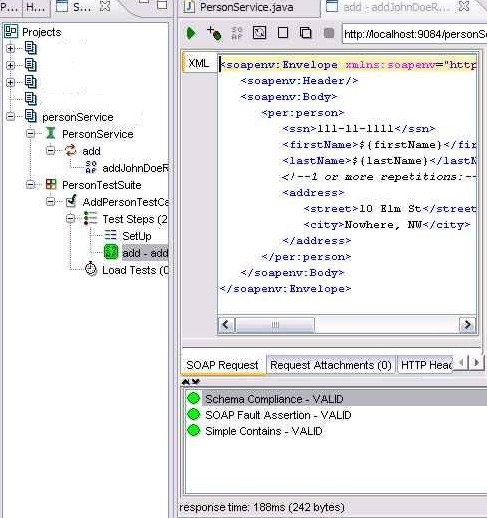
SoapUI Project (you can import it into SoapUI).
You can also download all files in a zip file.
Thanks for this excellent tutorial. Link to the soapUI tool is broken. I don’t know whether it would be useful for others if you note that soapui eclipse plugin doesn’t work well on Linux (it at least doesn’t work on my desktop, 2.6.20-1.2952.fc6).
In the PersonService.java file values of the serviceName and portName attributes were wrong they need to be changed with each other’s value. Without this fix you may get the following error.
WSSERVLET11: failed to parse runtime descriptor: java.lang.IllegalArgumentException: getNamespaceURI(String prefix) is called with a null prefix.
Mahmut:
Thanks for pointing out the broken link. I certainly agree that SoapUI Eclipse plugin is rough on edges, I was not aware of the Linux problem.
Not sure about your specific error, I tested the example with WAS 6.1 with WS feature pack which uses Axis2 under the covers. It looks like you’re using JAX-WS RI, I can’t really tell you what the issue might be.
Best regards,
Alexander
I was wrong when suggesting there is an error in the serviceName and portName attributes, as the naming was intentional as explained in the “WSDL Naming Conventions” entry in this blog.
The null prefix problem I mentioned above disappears if I use an extended namespace such as http://personservice.myarch.com instead of the existing one which is http://personservice. It is strange that if I remove the namespace annotations in the java files jaxws selects the namespace as http://personservice and can use it without the null prefix problem.
Hi Alexander,
I tried your tutorial and get the following error from my Tomcat 5.5.9.
SCHWERWIEGEND: WSSERVLET11: failed to parse runtime descriptor: java.lang.NullPointerException
java.lang.NullPointerException
at com.sun.xml.stream.xerces.util.SymbolTable.hash(SymbolTable.java:222)
at com.sun.xml.stream.xerces.util.SymbolTable.addSymbol(SymbolTable.java:143)
at com.sun.xml.stream.XMLReaderImpl.getNamespaceURI(XMLReaderImpl.java:1238)
at com.sun.xml.ws.streaming.TidyXMLStreamReader.getNamespaceURI(TidyXMLStreamReader.java:204)
at com.sun.xml.ws.wsdl.parser.ParserUtil.getQName(ParserUtil.java:54)
at com.sun.xml.ws.wsdl.parser.RuntimeWSDLParser.parsePortTypeOperationInput(RuntimeWSDLParser.java:509)
at com.sun.xml.ws.wsdl.parser.RuntimeWSDLParser.parsePortTypeOperation(RuntimeWSDLParser.java:498)
at com.sun.xml.ws.wsdl.parser.RuntimeWSDLParser.parsePortType(RuntimeWSDLParser.java:474)
at com.sun.xml.ws.wsdl.parser.RuntimeWSDLParser.parseWSDL(RuntimeWSDLParser.java:213)
at com.sun.xml.ws.wsdl.parser.RuntimeWSDLParser.parse(RuntimeWSDLParser.java:66)
at com.sun.xml.ws.server.RuntimeEndpointInfo.createSEIModel(RuntimeEndpointInfo.java:171)
at com.sun.xml.ws.server.RuntimeEndpointInfo.init(RuntimeEndpointInfo.java:315)
at com.sun.xml.ws.transport.http.servlet.WSServletContextListener.createModelAndMetadata(WSServletContextListener.java:197)
at com.sun.xml.ws.transport.http.servlet.WSServletContextListener.contextInitialized(WSServletContextListener.java:117)
at org.apache.catalina.core.StandardContext.listenerStart(StandardContext.java:3669)
at org.apache.catalina.core.StandardContext.start(StandardContext.java:4104)
at org.apache.catalina.core.ContainerBase.addChildInternal(ContainerBase.java:759)
at org.apache.catalina.core.ContainerBase.addChild(ContainerBase.java:739)
at org.apache.catalina.core.StandardHost.addChild(StandardHost.java:524)
at org.apache.catalina.startup.HostConfig.deployDescriptor(HostConfig.java:589)
at org.apache.catalina.startup.HostConfig.deployDescriptors(HostConfig.java:536)
at org.apache.catalina.startup.HostConfig.deployApps(HostConfig.java:471)
at org.apache.catalina.startup.HostConfig.start(HostConfig.java:1102)
at org.apache.catalina.startup.HostConfig.lifecycleEvent(HostConfig.java:311)
at org.apache.catalina.util.LifecycleSupport.fireLifecycleEvent(LifecycleSupport.java:119)
at org.apache.catalina.core.ContainerBase.start(ContainerBase.java:1020)
at org.apache.catalina.core.StandardHost.start(StandardHost.java:718)
at org.apache.catalina.core.ContainerBase.start(ContainerBase.java:1012)
at org.apache.catalina.core.StandardEngine.start(StandardEngine.java:442)
at org.apache.catalina.core.StandardService.start(StandardService.java:450)
at org.apache.catalina.core.StandardServer.start(StandardServer.java:683)
at org.apache.catalina.startup.Catalina.start(Catalina.java:537)
at sun.reflect.NativeMethodAccessorImpl.invoke0(Native Method)
at sun.reflect.NativeMethodAccessorImpl.invoke(NativeMethodAccessorImpl.java:39)
at sun.reflect.DelegatingMethodAccessorImpl.invoke(DelegatingMethodAccessorImpl.java:25)
at java.lang.reflect.Method.invoke(Method.java:597)
at org.apache.catalina.startup.Bootstrap.start(Bootstrap.java:271)
at org.apache.catalina.startup.Bootstrap.main(Bootstrap.java:409)
Do you have any Idea, where this error resides ? Where should I start searching ?
Thanks and regards,
Sebastian
Hi Sebestian,
You can find working version of this example for jaxws on the following address.
http://www.ebi.ac.uk/~uludag/tutorial-myarch.com/
Basically I commented out the namespace definition in the Person and PersonService classes and let jaxws select the namesapce. It is strange that this example works for me even without the ObjectFactory class. If you want to download my eclipse project, I enclosed it in the following archive.
http://www.ebi.ac.uk/~uludag/tutorial-myarch.com.zip
Hi all..
Ole from the soapUI team here.. please let us know if you still have problems with the soapui-eclipse-plugin on Linux so we can get this sorted out.. either mail me directly or (even better) post on our sourceforge forums..
thanks in advance!
regards,
/Ole
eviware.com
Hi Alexander,
Based on your example, I tried writing my client but I get the following error. Any idea why is this?
Exception in thread “main” java.lang.NullPointerException
at com.sun.xml.stream.xerces.util.SymbolTable.hash(SymbolTable.java:222)
at com.sun.xml.stream.xerces.util.SymbolTable.addSymbol(SymbolTable.java:143)
at com.sun.xml.stream.XMLReaderImpl.getNamespaceURI(XMLReaderImpl.java:1238)
at javax.xml.stream.util.StreamReaderDelegate.getNamespaceURI(StreamReaderDelegate.java:94)
at com.sun.xml.ws.wsdl.parser.ParserUtil.getQName(ParserUtil.java:66)
at com.sun.xml.ws.wsdl.parser.RuntimeWSDLParser.parseMessage(RuntimeWSDLParser.java:773)
at com.sun.xml.ws.wsdl.parser.RuntimeWSDLParser.parseWSDL(RuntimeWSDLParser.java:304)
at com.sun.xml.ws.wsdl.parser.RuntimeWSDLParser.parseWSDL(RuntimeWSDLParser.java:262)
at com.sun.xml.ws.wsdl.parser.RuntimeWSDLParser.parse(RuntimeWSDLParser.java:133)
at com.sun.xml.ws.client.WSServiceDelegate.parseWSDL(WSServiceDelegate.java:222)
at com.sun.xml.ws.client.WSServiceDelegate.(WSServiceDelegate.java:184)
at com.sun.xml.ws.client.WSServiceDelegate.(WSServiceDelegate.java:159)
at com.sun.xml.ws.spi.ProviderImpl.createServiceDelegate(ProviderImpl.java:82)
at javax.xml.ws.Service.(Service.java:56)
Hi Sudheendra,
Please see the comment from Mahmut Uludag in this thread, it has something to do with how jaxws interprets namespaces.
Regards,
I’m the beginner in studying JAX-WS, please show me more detail about how to create an example
In this tutorial, you only give me code but you don’t tell me where to put that code in
And tell me what software at least need to be used.
I read some other material on Internet, each page give me different softwares to install
As I understand that we need to install JAX-WS 2.0 to create WS on server and NetBean to create client side
Please guide me step by step
Thank you for your paying time
———–
CongPhuoc-Phan
I’d be really helpful if you could take it one step further and show how to populate the objects with data from a database or using Hibernate. I know I’m pretty confused on how to make all these different technologies work together in a solid application architecture.
Hi can u just add some more to it like how to deploy the same web service on tomcat it works fine with java client but how to do it on tomcat6.0
Hi Vishal, deployment to Tomcat (assuming you’re using XFire or a similar WS container) should be no different than deploying a regular web app (war file). I’ll try to update the post, thanks for the suggestion.
I wonder if there is any reason for handcrafting Person/Address Java classes instead of using a compiler like XJC for generating Person.java and Address.java based off the XSD created in step #3.
cheers
If you are using jax-ws groovyws or want to experiment, then please try it with SoaMoa. It is a generic SOAP client for tests and code generation.
SoaMoa can be downloaded from http://soamoa.org/download.html
I have been developing a service keeping the above model as reference. I am able to create a service and successfully deployed. When a request has been sent, the values in the soap request are not set to object and it returns null. Can anybody guess where will be the problem if the mapping doesn’t occur?
I got solved. I missed the namespace for the xml element. When I included, it worked perfect. Thanks for your tutorial.
Is the above tutorial an example of RESTFUL Web Services
Can anyone guide me to some link where i can get the understanding of different approaches available for Web service development and their Pros & Cons.
Rohit, no, this is not a restful service.
Hi,
I’m really new to this web service techonology. And as of now only using AXIS2 as my service container. Can some one will guide me how to deploy the above as my axis2 webservice?
Axis itsself is providing some example, but that seems to be far above my head.
Any help will be appreatiated.
Thanks
/Abhi
I run the example on WebSphere 6.1 with its WS feature pack. I got an error like this:
[11/6/09 16:12:48:957 EST] 00000028 SystemErr R Caused by: java.lang.ClassCastException: personservice.Person$JaxbAccessorF_addresses incompatible with com.sun.xml.bind.v2.runtime.reflect.Accessor
at com.sun.xml.bind.v2.runtime.reflect.opt.OptimizedAccessorFactory.instanciate(OptimizedAccessorFactory.java:151)
at com.sun.xml.bind.v2.runtime.reflect.opt.OptimizedAccessorFactory.get(OptimizedAccessorFactory.java:143)
at com.sun.xml.bind.v2.runtime.reflect.Accessor$FieldReflection.optimize(Accessor.java:204)
at com.sun.xml.bind.v2.runtime.property.ArrayProperty.(ArrayProperty.java:29)
at com.sun.xml.bind.v2.runtime.property.ArrayERProperty.(ArrayERProperty.java:45)
at com.sun.xml.bind.v2.runtime.property.ArrayElementProperty.(ArrayElementProperty.java:60)
at sun.reflect.GeneratedConstructorAccessor38.newInstance(Unknown Source)
at sun.reflect.DelegatingConstructorAccessorImpl.newInstance(DelegatingConstructorAccessorImpl.java:45)
at java.lang.reflect.Constructor.newInstance(Constructor.java:522)
at com.sun.xml.bind.v2.runtime.property.PropertyFactory.create(PropertyFactory.java:88)
at com.sun.xml.bind.v2.runtime.ClassBeanInfoImpl.(ClassBeanInfoImpl.java:135)
at com.sun.xml.bind.v2.runtime.JAXBContextImpl.getOrCreate(JAXBContextImpl.java:432)
at com.sun.xml.bind.v2.runtime.JAXBContextImpl.(JAXBContextImpl.java:265)
at com.sun.xml.bind.v2.ContextFactory.createContext(ContextFactory.java:76)
at com.sun.xml.bind.v2.ContextFactory.createContext(ContextFactory.java:55)
at sun.reflect.NativeMethodAccessorImpl.invoke0(Native Method)
at sun.reflect.NativeMethodAccessorImpl.invoke(NativeMethodAccessorImpl.java:79)
at sun.reflect.DelegatingMethodAccessorImpl.invoke(DelegatingMethodAccessorImpl.java:43)
at java.lang.reflect.Method.invoke(Method.java:618)
at javax.xml.bind.ContextFinder.newInstance(ContextFinder.java:210)
at javax.xml.bind.ContextFinder.find(ContextFinder.java:381)
at javax.xml.bind.JAXBContext.newInstance(JAXBContext.java:574)
at javax.xml.bind.JAXBContext.newInstance(JAXBContext.java:522)
at org.apache.axis2.jaxws.message.databinding.JAXBUtils$4.run(JAXBUtils.java:819)
at org.apache.axis2.java.security.AccessController.doPrivileged(AccessController.java:130)
at org.apache.axis2.jaxws.message.databinding.JAXBUtils.JAXBContext_newInstance(JAXBUtils.java:816)
at org.apache.axis2.jaxws.message.databinding.JAXBUtils.createJAXBContextValue(JAXBUtils.java:313)
at org.apache.axis2.jaxws.message.databinding.JAXBUtils.getJAXBContext(JAXBUtils.java:146)
at org.apache.axis2.jaxws.marshaller.factory.MethodMarshallerFactory.isContextPathConstruction(MethodMarshallerFactory.java:216)
at org.apache.axis2.jaxws.marshaller.factory.MethodMarshallerFactory.isDocLitBareMinimal(MethodMarshallerFactory.java:199)
at org.apache.axis2.jaxws.marshaller.factory.MethodMarshallerFactory.createDocLitMethodMarshaller(MethodMarshallerFactory.java:120)
at org.apache.axis2.jaxws.marshaller.factory.MethodMarshallerFactory.getMarshaller(MethodMarshallerFactory.java:103)
at org.apache.axis2.jaxws.server.dispatcher.JavaBeanDispatcher.getMethodMarshaller(JavaBeanDispatcher.java:234)
at org.apache.axis2.jaxws.server.dispatcher.JavaBeanDispatcher.invoke(JavaBeanDispatcher.java:71)
at org.apache.axis2.jaxws.server.EndpointController.invoke(EndpointController.java:169)
at org.apache.axis2.jaxws.server.JAXWSMessageReceiver.receive(JAXWSMessageReceiver.java:114)
at org.apache.axis2.engine.AxisEngine.receive(AxisEngine.java:220)
at org.apache.axis2.transport.http.HTTPTransportUtils.processHTTPPostRequest(HTTPTransportUtils.java:271)
at com.ibm.ws.websvcs.transport.http.WASAxis2Servlet.doPost(WASAxis2Servlet.java:907)
at javax.servlet.http.HttpServlet.service(HttpServlet.java:763)
at javax.servlet.http.HttpServlet.service(HttpServlet.java:856)
at com.ibm.ws.webcontainer.servlet.ServletWrapper.service(ServletWrapper.java:1101)
at com.ibm.ws.webcontainer.servlet.ServletWrapper.handleRequest(ServletWrapper.java:569)
at com.ibm.ws.wswebcontainer.servlet.ServletWrapper.handleRequest(ServletWrapper.java:478)
at com.ibm.ws.webcontainer.servlet.CacheServletWrapper.handleRequest(CacheServletWrapper.java:90)
at com.ibm.ws.webcontainer.WebContainer.handleRequest(WebContainer.java:748)
at com.ibm.ws.wswebcontainer.WebContainer.handleRequest(WebContainer.java:1461)
at com.ibm.ws.webcontainer.channel.WCChannelLink.ready(WCChannelLink.java:119)
at com.ibm.ws.http.channel.inbound.impl.HttpInboundLink.handleDiscrimination(HttpInboundLink.java:458)
at com.ibm.ws.http.channel.inbound.impl.HttpInboundLink.handleNewInformation(HttpInboundLink.java:387)
at com.ibm.ws.http.channel.inbound.impl.HttpInboundLink.ready(HttpInboundLink.java:267)
at com.ibm.ws.tcp.channel.impl.NewConnectionInitialReadCallback.sendToDiscriminators(NewConnectionInitialReadCallback.java:214)
at com.ibm.ws.tcp.channel.impl.NewConnectionInitialReadCallback.complete(NewConnectionInitialReadCallback.java:113)
at com.ibm.ws.tcp.channel.impl.AioReadCompletionListener.futureCompleted(AioReadCompletionListener.java:165)
at com.ibm.io.async.AbstractAsyncFuture.invokeCallback(AbstractAsyncFuture.java:217)
at com.ibm.io.async.AsyncChannelFuture.fireCompletionActions(AsyncChannelFuture.java:161)
at com.ibm.io.async.AsyncFuture.completed(AsyncFuture.java:136)
at com.ibm.io.async.ResultHandler.complete(ResultHandler.java:195)
at com.ibm.io.async.ResultHandler.runEventProcessingLoop(ResultHandler.java:743)
at com.ibm.io.async.ResultHandler$2.run(ResultHandler.java:873)
at com.ibm.ws.util.ThreadPool$Worker.run(ThreadPool.java:1473)
Has anyone come across this?
Thanks,
Song
I am trying to develop JAX-WS webservices using WAS6.1, RAD v7, Java 5.0 on WIndows XP. Is it possible to develop the above example with this configuration without using Web Services Feature Pack(WSFP)? Our company does not allow for the installation of the feature pack.
Thanks.
Hi Mittu. You’re out of luck with WAS6.1 without WSFP. JAX-RPC is your only option. You can also try running an open source Web services container in WAS, but that’s a whole different ball of wax.
Thanks so much Alexander.
I am trying to generate the service from wsdl, i.e top-down way. I used wsimport from JAX-WS 2.1.7 and generated the stubs, and during the publishing to the WAS 6.1 server, I am getting api errors like noSuchMethod error …
But I was successful in developing a Restful webservice using JAX-WS, WAS6.1, RAD v7, Java 5.0 on WIndows XP
So I was wondering that if restful type of web services are successfully deployed using the above configuration then why not the services developed using soap/wsdl?
let me know your opinion, thanks so much.
I tried to do the same thing what is done here, but with some minor changes. I am new to WebServices, when I tried to run the code, it gives me the following error in the webservice output…
−
−
soapenv:Client
−
javax.xml.bind.UnmarshalException
– with linked exception:
[javax.xml.bind.UnmarshalException: unexpected element (uri:”http://www.example.org/MySchema”, local:”Person”). Expected elements are ]
What could be the cause for the issue? and How do I add my project for reference? Secondly. I tried that on WAS 6.1
Not able to see the exact error, adding it again here.
javax.xml.bind.UnmarshalException
– with linked exception:
[javax.xml.bind.UnmarshalException: unexpected element (uri:”http://www.example.org/MySchema”, local:”Person”). Expected elements are ]
Still dont see the last line , I guess its due to less then symbol… BTW the last line is
Expected elements are ] [{http://www.example.org/MySchema}person>]
Can anybody tell me how you wrote your Main-Class or what has to be done to use the Files
Orlistat , buy Orlistat online
Orlistat
Hi, wtp wsdl nor soapui could resolve the wdsl import of person.xsd.
This is my project structure:
myproject
–src
—-main
——java
——wsdl
——– persnService.wsdl
——– person.xsd
I gave up and hacked the wsdl to contain the xsd. For others who have he same problem, I also had to change
this
to
and the header to:
etc.
I dont know what url I should be hitting with soapui.
I have tried:
http :// localhost : 8080 / myproject/personService/
http :// localhost : 8080 /myproject
http :// localhost : 8080 /myproject/personService/personServicePorts
Etc.
The java and wsdl are exactly as downloaded from the site.
And also:
http :// localhost : 8080 / myproject/PersonServicePorts.
All give 404.
I just did run on server in eclipse. my test servlet and test jsp page are working. There is no mention in the web.xml of the services. How does tomcat know about the services and their classes?
I notice in your factory class, the line:
wsdlLocation=”WEB-INF/wsdl/PersonService.wsdl”
How does it get into the WEB-INF? neither eclipse, nor maven package put it in there from the source dir.
So once the source files are in the project, how do you build it?
Sorry for my stupidity.
Hi Simon,/root in Tomcat and configured Eclipse to compile into WEB-INF/classes. For WebSphere I use Ant to build.
It’s a totally valid question. What you need to put in web.xml depends on your container. I was testing with WebSphere which employs some AOP “magic” so you don’t need to do anything explicitly. But for xfire, as an example, you do need to specify a servlet: http://myarch.com/files/jaxws_tutorial/web.xml.
As far as your second question, I pointed to
I am using RAD7.5 with Websphere 7 and could not find the url to use either. Kept coming back as 404 not found.
I have an existing web project already which I manually added the folder wsdl to /web-inf and the two files personService.wsdl
person.xsd. Everything compiled nicely and published automatically but soapUI did not work.
What I did was go into the Websphere admin console, clicked on my web ear and under the option “Web Services Properties” you can “Publish WSDL files ” which sent back what RAD and Websphere did to it.
In my case for some reason, it came back with this info in the new file wsdl http://d19d99:80/PersonServicePorts
So when launching SoapUI tester, I put this url instead under the override tab for the endpoint which then worked.
Hi,
Can you give the proper steps to install the softwares required for this and setup in eclipse
The webservice is a very nice example. Thanks for the same
I am not able to run this webservice, gives a Null Pointer Exception as discussed above by Prabhu.
Still trying .. please suggest
Great example, especially for using a complex type as the web method arg, but…
…I too am not getting the Person instance fully populated by JAX-B. I get an instance of the correct class, but none of the fields are set.
Sadly Prabhu’s solution is not specific enough to fix it, although I’m following that as a lead. Help! :-)
Plz add a quick chunk of a client code to invoke the server side song. will be then more impressive
Hi Alexander,
Could pls help to execute my webservice succesfully?
1) when I try to search for wsdl http://localhost:8081/personService/personService?wsdl
I am Unable to find. Is this the right URL to make a call from soap UI
2) How to change the endpoint URL(with servername and port) dynamically when ever we upload to any server.
ex: http://server1:8082
Thank heaps,
Sarada
for those facing issues and getting errors with the use of wsimport tool, note that you need to have compatible version of JDK. I have also blogged about wsimport ANT task which was earlier called WSDL to Java.